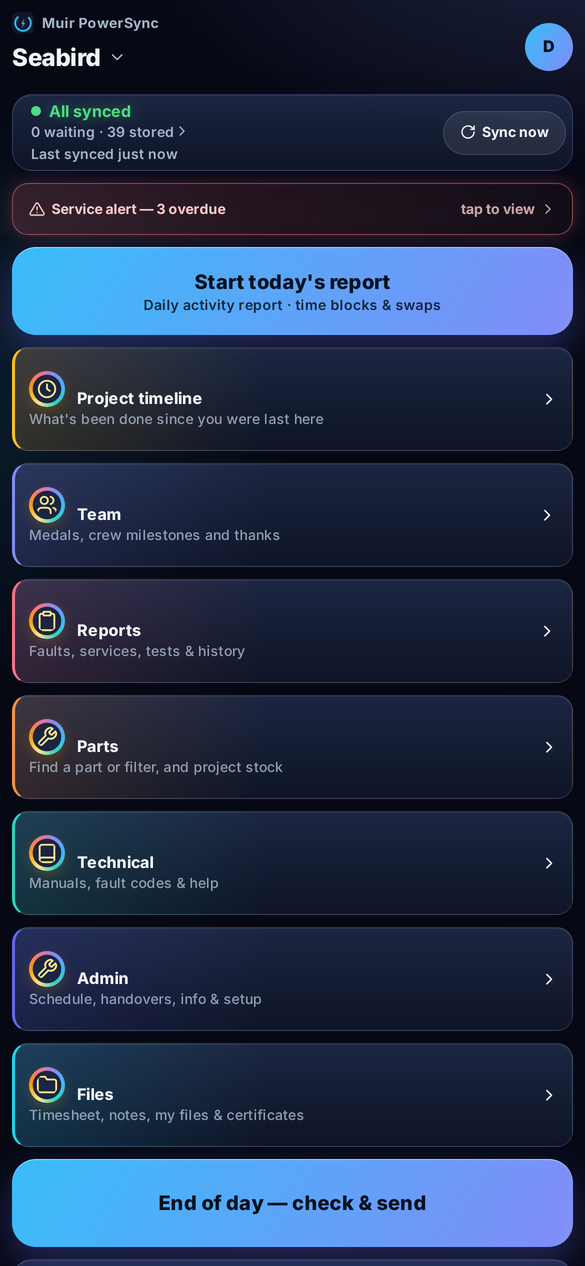
Log daily activity, faults and services on site, in the yard, or offshore. Everything saves on the phone and syncs to the office when you're back in coverage.
Big, glove-friendly buttons · Photos & PDF export · Works fully offline
Less paperwork. Fewer lost logs.
Works offline, all trip
No signal? Keep logging. Entries wait safely on the phone and send themselves when you're back in coverage.
Built for the field
Big buttons and high contrast for gloves and daylight. Photos on reports and one-tap PDF export.
Every asset, tracked
Know where every genset, powerpack and fuel tank is, with moves, hours, fuel level and service status.
One price, per user
Per user
£5 / month
Every named person who signs in — admins and technicians count the same. The same full offline app for everyone.
Launch pricing, excluding VAT. A customer who takes it at this price keeps that rate. We may charge new customers more later. Pay yearly and get two months free — £50 per user per year. Setup is self-service — no setup fee. Prefer us to set it up for you? Get in touch — an optional set-up fee applies.
How to ask for your account and its data to be deleted.
Your projects · last 30 days
Alerts
Get fault alerts for
Phone alerts
team
Send a shout-out
0 / 200
The project team sees it in the Team feed, and your teammate gets it in their alerts bell.
➕ Add New Part
📍 Location & category
Where is it kept?
➕ Add New Asset
More details (optional)
Serials, engine, alternator, controller… fill in what you can see on the plates. Leave the rest blank.
🔗 Link a manual to models
Tick the models this manual covers. Technicians then see it on those assets and their reports.
➕ Add a manual
Pick the PDF and the file is stored for you. Tick the models it covers and technicians see it on those assets.
PDF only, up to 20 MB.
A library manual is matched to each company's own models when they tick it — name the models it covers as the maker names them. Ticking a model below is optional; you can also type others in.
📚 Add from library
Tick the manuals you want on this company's list. The ones for your kit are ticked already — untick any you don't want. Nothing is added until you tap Add ticked.
Working in
Muir PowerSync
Status
Last synced
My recent work
🔍
👥 Team
📋 Reports
On a job? Raise these from inside your DAR time block instead — they'll come pre-filled. This page is for office-raised reports and browsing each type's history.
These open each report's history. A view-only login cannot add or change a report.
🔧 Parts
📚 Manuals
🛠️ Admin
📄 Files
DAILY ACTIVITY REPORT
Today So Far
Add Time Block
✏️ Editing this entry — you can correct any field, including the times, without creating a duplicate.
End Of Day
Completed Daily Reports
All Individual Entries
0
Waiting to sync
0
Total Stored
✅ DAY COMPLETE
MUIR POWERSYNCDAILY ACTIVITY REPORT
MUIR POWERSYNCDAILY ACTIVITY REPORT
Date
Site
Technician
Day
🗂️ Work Orders
View only — this login can look, but it cannot create a work order.
Create Work Order
📊 PROJECT STATUS
🔍
Work Order
Time & Travel Blocks
Reports linked to this job
Opens that report form for this job's project. Save it as normal there, then come back here and tap LINK next to it.
Assign techs
Who's on this job
Planned hours
Pick who’s on this job above — their planned hours appear here.
🕒 TIMESHEET
View only — this login can look, but it cannot change a timesheet.
My usual week — set it once, then one tap fills the week.
Total Hours0
View only — this login can look, but it cannot change a timesheet.
MUIR POWERSYNCTIME BLOCK
ASSET SUMMARY
Logged Details
🚨 Defect / Breakdown Logged
Notification Info:
Diagnostics & Actions:
Spares Used:
🔧 Maintenance Counter
SERVICE AT:
NEXT DUE (+500 hrs):
Parts / Consumables Used:
Checklist Results:
🔬 Insulation Resistance Test
ASSET:
TEST VOLTAGE:
AMBIENT TEMP:
INSTRUMENT:
Test Points:
Notes:
Activity
Project
Location
Asset
Powerpack
Fuel Tank
Time Slot
Run Hours
Technician
Performance Checks
Running On Arrival
Running On Depart
Oil Pressure
Charge Voltage
Engine Temp
Leaks Present
Fluids & Fuel Logs
Fuel Arrival
Fuel Bunkered
Fuel Departure
Oil Added
Coolant Added
General Shift Notes
Photos
Linked Fault Report
Technician Signature
Date
📋 NEW COMMISSIONING REPORT
📦 This report will be linked to the same visit/package as the one you just saved.
Header Information
Handover & Sign-off
0
Waiting to sync
0
Total Stored
MUIR POWERSYNCCOMMISSIONING REPORT
Commissioning Report
Project
Location
Date
Site Ref No.
Asset Identification
Generator Serial Number
Make
Model
Fuel Tank ID
Transformer ID
Engine Serial
Alternator Serial (data plate)
Run Hours
Live Operational Metrics
Fuel Level
Running Temperature
Oil Pressure
DC Charge Voltage
iRams / Live Link Serial
Pre-Start & Mechanical Checklist
Electrical Testing & Protection Settings
L1-L2
L2-L3
L3-L1
L1-N
L2-N
L3-N
Earth Leakage x1 (0.30mA setting)
Earth Leakage x5
Handover & Sign-off
Comments / Notes
Photos
Technician
🚨 NEW FAULT REPORT
Readings Taken (optional)
0
Waiting to sync
0
Total Stored
MUIR POWERSYNCFAULT REPORT
Fault Report
Fault Status
Has the fault been rectified?
Only "rectified" closes the fault. Writing up the work — here or in the repair box — records what was done, but it doesn't close the fault on its own. If the work was done and the fault is still there, answer no and say why: needs parts, needs further investigation, or your own reason.
Turned out not to be fixed? Raise a new fault linked to this one — this report stays as the record, and the new one carries the link both ways.
Project
Location
Asset
Make
Model
Run Hours
Breakdown Notification Details
Fault Description
Diagnostics & Work Carried Out
AC Volts
Frequency
Battery Volts
DC Charge Rate
Coolant Temp
Parts / Spares Used
Photos
On the DAR
Technician
🔧 NEW SERVICE REPORT
Service Checklist
0 of 0 items checkedReset
Readings Taken
Parts / Consumables Used
0
Waiting to sync
0
Total Stored
MUIR POWERSYNCSERVICE REPORT
Service Report
Project
Location
Asset
Make
Model
Run Hours
Status
Service Completed At
Next Service Due
Readings Taken
AC Volts
Frequency
Battery Volts
DC Charge Rate
Coolant Temp
Checklist
Parts / Consumables Used
General Notes
Photos
Technician
🛠️ NEW JOB REPORT
Parts / Consumables Used
0
Waiting to sync
0
Total Stored
MUIR POWERSYNCJOB REPORT
Job Report
Project
Location
Asset
Make
Model
Asset description
Arrival
Departure
Time on Job
Work Done
Parts / Consumables Used
Photos
Technician
🔬 NEW ELECTRICAL TEST
PI (Polarization Index) auto-calculates when both 1 min and 10 min readings are entered. Reference your equipment manual for pass/fail thresholds — this just records and calculates, it doesn't judge.
0
Waiting to sync
0
Total Stored
MUIR POWERSYNCELECTRICAL TEST
Electrical Test Report
Project
Location
Asset
Make
Model
Asset Type
Asset / Equipment ID
Test Voltage
Ambient Temp
Instrument Used
Test Points
Test Notes / Observations
Photos
Technician
🧰 NEW GENERAL INSPECTION
A condition check of a unit wherever it is — on site, in the yard or between hires — before it works, sits or goes out again.
Readings (optional)
Checklist
0
Waiting to sync
0
Total Stored
MUIR POWERSYNCGENERAL INSPECTION
General Inspection Report
Project
Location
Asset Type
Asset ID
Make
Model
Readings
Running on arrival
Running on departure
Fuel on arrival
Fuel bunkered
Fuel on departure
Oil added
Coolant added
Oil pressure
Charge volts
Engine temp
Leaks
Checklist
Notes
Photos
Technician
📦 NEW PDI
Quick check before this goes back out — already been through General Inspection, this is the final look before delivery.
Checklist
0
Waiting to sync
0
Total Stored
MUIR POWERSYNCPRE-DELIVERY INSPECTION
PDI Report
Project
Location
Asset Type
Asset ID
Make
Model
Destined For
Checklist
Notes
Photos
Technician
📈 NEW LOAD TEST
Test Setup
Set Rating (nameplate)
Load Steps
Target kW fills in automatically from the rated kW above. Warnings are hints only — you still set the overall result yourself.
Result
0
Waiting to sync
0
Total Stored
MUIR POWERSYNCLOAD TEST
Load Test Report
Project
Location
Asset
Make
Model
Run Hours
Test Setup
Test Type
Tested To
Load Bank
Connected At
Start / Finish
Run Hours
Ambient
Set Rating
Rating
Nominal
Load Steps
Max kW Achieved
Max Load Step
Worst Current Imbalance
Overall Result
Observations / Defects
Photos
Tested By
Witnessed By
Next Test Due
Technician
Asset
Asset details
Add new model
Add component
Asset history
📋 Stock list
🔍
✅ Stock check
Progress
Fleet
🏢 Companies & trials
Start a pilot
A couple of minutes to register. They get their own company database, set up from the standard template — your data is never copied. The workspace is ready once its database is provisioned.
Companies
🏅 My achievements
🔒 Only you can see this. It's worked out on this phone from your own records and isn't shared with anyone, including managers and admins.
Thanks from your team
Personal bests
Quiz personal bests
Milestones
🧠 Team quiz
Pick the kit, answer ten questions, learn as you go. Your scores and bests stay on this phone — only a perfect 10/10 is shared with your team.
👥 Team ·
👥 Only this project's team sees this: its technicians, project manager and admins. Never clients or viewers. No rankings, no comments.
Privacy
Your numbers and personal bests are never shared, only the medal itself. Turning this off also takes medals you already shared out of the feed.
🕘 Timeline
📝 Notes
Quick, timestamped comments for a project — a call with the customer, a heads-up for the next tech, anything worth a record without a full log entry.
View only — this login can look, but it cannot add a note.
🔒 My Files
Your own private storage — certs, manuals, photos, anything worth keeping. Only you can see or open these files, not even an admin. Max 4MB per file.
View only — this login can look and download, but it cannot add or delete a file.
Asset types
Templates are a starting point. Turn on what you hire out, or build your own. Existing gensets, powerpacks and fuel tanks keep working as they do today.
Create a type
Blank start. A template only pre-fills this. The type can be anything you hire out.
Pack email recipients
The End of Day pack is the company's own record of the day, and it is emailed to the addresses on this list. Anyone sending the pack can still change the addresses for that one send — the list itself only changes here.
Projects
The projects this company works on. Add a new one here; a project can only be deleted while it is completely empty — anything with work on it is marked completed instead, from the Dashboard.
Completed projects are under Admin → Completed projects.
Customers
The customers this company works for. Work is filed under a customer on the day sheet; tap Work history on any customer to see everything done for them — every block, the hours split by activity, and their previous reports.
Work history
Customer info
Project team
The people on this project's team are the people who can be assigned its work orders. Tap a name to add or remove them, then save. Taking someone off a project also takes them off its open jobs and drops their planned days on it.
Set up your app
Every step can be skipped and finished later — find what's left any time from the Home banner or Admin → Setup checklist.
✅ Setup checklist
A tick appears when the thing itself exists — not when a step was viewed — or when you have explicitly skipped it. Tap a row to finish that part.
Email domains
The app can only send day packs and reports to email addresses at these domains.
⏳ A change is waiting to sync — it takes over once it reaches the server.
Equipment registers
The defaults only start a new item off — every item's own interval can be changed on the item. Intervals are your company's choice.
Parts requests go to
When someone asks for a part or flags low stock, the alert and the phone push go to these people — and nobody else. The short-stock list itself stays as it is: managers and admins can still see it.
The parts contact is emailed every request and flag — use it for someone who doesn't use the app. If their name matches a login on this company, they get the alert in the app as well. Leave the email blank to switch the parts email off.
⏳ A change is waiting to sync — it takes over once it reaches the server.
🎓 Certificates
📡 You're offline. This is the list from your last sync. Adding, downloading and emailing certificates need a connection.
Only you can open your files. Project managers and admins see the type and dates, never the file, unless you email it to them. Reminders come 30 days and 7 days before expiry, and on the day.
View only — this login can look, but it cannot add or change a certificate.
Files in My Files you can make into a certificate
The people on your projects and their certificates, soonest expiry first. Type and dates only: files stay private to their owner.
Company registers
Items the company keeps dated checks on. The next due date works itself out from the last date and the interval — reminders come 30 days before and on the day, to admins and managers.
📡 You're offline. This is the list from your last sync.
View only — this login can look, but it cannot add or change a register item.
My certificates
Add certificate
PDF up to 4 MB, or a photo (made smaller before upload).
Company registers
Add item
The next due date is worked out from the last date plus this interval.
Sent from the app, with the files attached
Email certificates
Certificates to send
Set up your lists
Add your gensets, powerpacks, fuel tanks, parts and the people who use the app. Download a template — Excel or CSV — fill it in with Excel or Google Sheets, then paste it here or choose the file. Nothing is saved until you check the list and press Save.
🦺 PPE VISUAL INSPECTION
💾 No save button needed — everything here saves automatically as you type and stamp.
Today's Checks
Kit Register — Numbers & Expiry Dates
Saved per technician — fill in once, update when kit changes. Expiry turns amber within 60 days, red when overdue.
Shift Log
Your recent checks on this device (last 60 days). The full permanent record for every technician is kept in the company records.
🌙 END OF DAY
One email: DAR spreadsheet + a PDF of every report saved today. Built from what's been synced, so make sure everything has synced first.